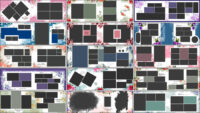
Doli photos are some of the most memorable parts of a traditional Indian wedding. From the bride’s emotional farewell to family portraits and beautiful wedding outfits, these moments deserve a good place in the final album. With these 20 Doli Wedding Album PSD Templates 12×36, photographers and album designers can create traditional wedding spreads without building every page from the beginning. You can also browse our wedding album design psd for more ideas for your next project.
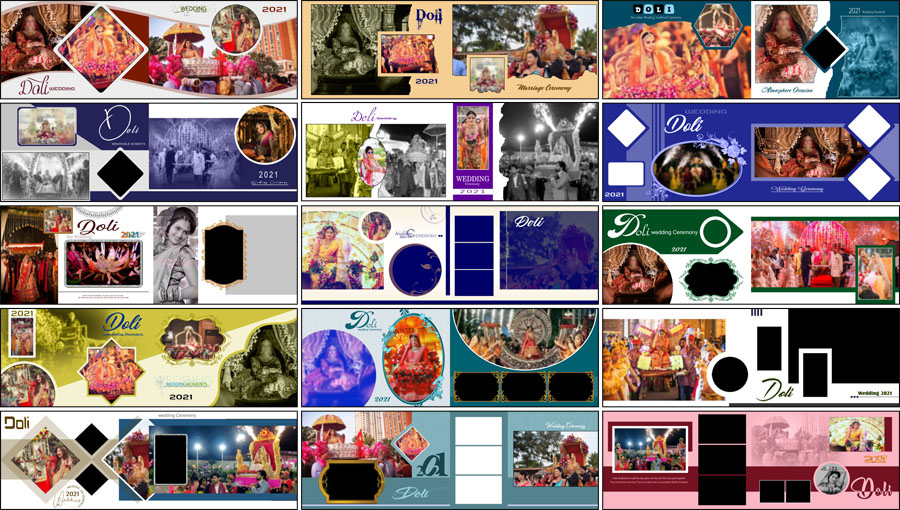
A well-designed Doli album should keep the bride and the important moments in focus. The photos need enough space, and the decorative elements should support the pictures instead of taking attention away from them. These Doli-themed layouts offer a starting point for arranging wedding photographs in a wide 12×36 album spread.
What Can You Create with Doli Wedding Album PSD Designs?
Doli-themed pages work well for traditional wedding albums, especially when the photographs include the bride’s farewell, family members, wedding rituals, and close-up portraits. You can use a large photo as the main focus and arrange smaller pictures around it to tell the story of the occasion.
When selecting a layout, look at the photographs you have received from the client. A page with several family moments may need a different arrangement from one built around a single bridal portrait. Choose a design that fits the pictures naturally rather than forcing every photo into a frame.
These templates can also give you ideas for Indian wedding album PSD projects, reception albums, and traditional ceremony spreads. For more Doli-related layouts, take a look at our Doli ceremony PSD templates.
12×36 Album PSD Pack Details
- Total designs: 20 Doli wedding album templates
- Album size: 12×36
- File format: Adobe Photoshop PSD
- Design theme: Traditional Doli and wedding photography
- Resolution: 300 DPI, as specified for the collection
- Editing features: Fully editable layers and smart object feature, where included in the supplied files
- Photoshop compatibility: Listed for Adobe Photoshop CS3 to CC 2026
- Download: Free PSD download
Before editing, open the downloaded PSD file and check its layer panel. The way layers and smart objects are arranged can vary from one file to another, so review the actual document before starting your work.

Zip File Password: www.Studiopk.in

Zip File Password: www.Studiopk.in

Zip File Password: www.Studiopk.in

Zip File Password: www.Studiopk.in

Zip File Password: www.Studiopk.in

Zip File Password: www.Studiopk.in

Zip File Password: www.Studiopk.in

Zip File Password: www.Studiopk.in

Zip File Password: www.Studiopk.in

Zip File Password: www.Studiopk.in

Zip File Password: www.Studiopk.in

Zip File Password: www.Studiopk.in

Zip File Password: www.Studiopk.in

Zip File Password: www.Studiopk.in

Zip File Password: www.Studiopk.in

Zip File Password: www.Studiopk.in

Zip File Password: www.Studiopk.in

Zip File Password: www.Studiopk.in

Zip File Password: www.Studiopk.in

Zip File Password: www.Studiopk.in
Tips for Designing a Clean Doli Album Spread
Give the Main Photograph Enough Space
Choose one strong photograph to lead the page. A clear bridal portrait or an important Doli moment can work well as the main image. Keep the face, jewellery and important details within the frame. Supporting photos should add to the story without making the page feel crowded.
Keep the Wedding Story in Order
Try to arrange related photos together. For example, pictures from the bride’s farewell can sit alongside other moments from that part of the ceremony. This makes the finished album easier for the family to follow and helps the pages feel connected.
Use Decorations Carefully
Traditional wedding layouts often include decorative borders, floral elements, and other ornaments. These can add character, but avoid adding too many extra details. When the photographs already have rich colours and detailed outfits, a balanced page usually works better than one filled with unnecessary decoration.
How to Edit a Doli Wedding Album PSD in Photoshop
Open the PSD in Adobe Photoshop and inspect the layers before replacing the photos. If the file uses a smart object for a photo frame, open that object, place your photograph, adjust the crop, and save it. Return to the main document to check the result. If the template uses regular image layers or clipping masks, follow the structure already provided in the file.
Keep the original proportions of each photograph when resizing it. Stretching an image to fill a frame can make faces and body shapes look unnatural. If a photo does not fit properly, adjust the crop or use another picture that suits the frame better.
After editing, review the complete 12×36 album design at a smaller zoom level. Check the spacing between photos, the balance across both sides of the spread, and any details that may sit too close to the edges. Save a working PSD so you can make changes later, then prepare the final output according to your album printer’s requirements.
Explore More Album Design PSD Collections
Different wedding functions need different layouts. These related collections can help you find more ideas for ceremony photos, traditional album pages, and matching covers.
- Indian Wedding Reception Ceremony Album Design
- Indian Karizma Album PSD Designs
- 25 Indian Wedding Album Design PSD Templates in 12×36
- 20 Free Traditional Wedding Album Design PSD Templates
You can find more options in our 12×36 Album PSD collection. When the inside pages are ready, browse the wedding album cover designs to find a suitable style for the front cover.
Frequently Asked Questions
Q: What is the size of these Doli wedding album templates?
A: The collection is designed for a 12×36 wedding album layout.
Q: Can I replace the photos in these PSD files?
A: Yes. Use the layer structure provided in each file to replace photos and adjust their crops. Smart object editing is available in files that include that feature.
Q: What should I check before printing the album?
A: Check the document size, resolution, photo crops, and edge spacing. Also confirm the export settings with your album printing service.
Download Doli Wedding Album PSD Templates
These 20 Doli wedding album designs can help you prepare traditional wedding spreads with less time spent arranging every page from scratch. Choose layouts that suit the photographs, keep the main moments clear, and make adjustments to match the couple’s wedding story. A little care with photo placement and spacing can make the finished album much more enjoyable to look through.