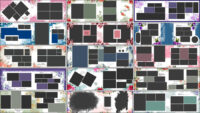
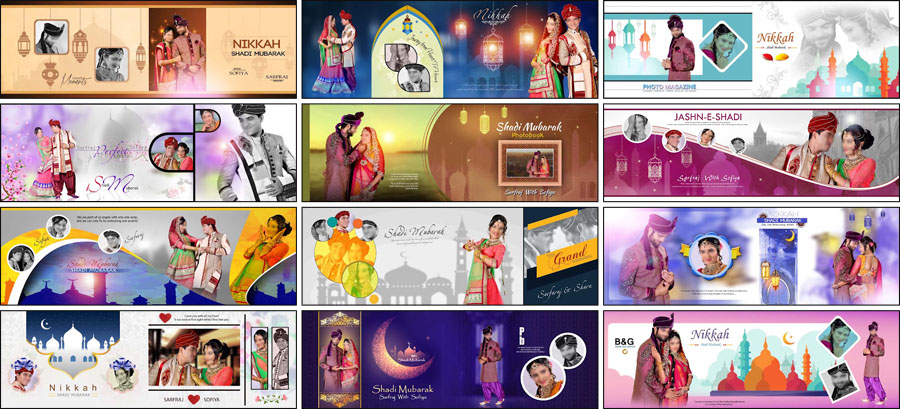
Wedding album designers often need layouts that can be adjusted to suit different couple portraits and album styles. This PSD Muslim Wedding Album 6×18 DM Sheets Collection includes 12 PSD sheet previews for designers and photo studios working on Muslim wedding album projects.
The files are provided in PSD format with editable Photoshop layers, so you can adjust the available design elements and place your selected photographs into the layout. You can also browse more free PSD designs for photo editing if you need additional resources for your studio work.
About the Muslim Wedding Album 6×18 DM Sheets
The 6×18 format offers a narrow, wide layout that can be used for DM sheets and couple portrait arrangements. These PSD templates can help you prepare wedding album pages without building every composition from scratch. Choose a design that suits your photographs, then adjust the placement and crop to make sure faces and other important details remain clear.
Every wedding project has a different set of photographs, so review each layout before choosing it for an album. For more ideas, visit these wedding album design PSD collections and explore other styles for your next project.
PSD File Details
- Collection: Muslim wedding album DM sheets
- Total previews: 12
- Design size: 6×18
- File format: PSD
- Layers: Editable in Adobe Photoshop
The original description lists the files as having 150px resolution. Before preparing artwork for print, open the PSD in Photoshop and check its Image Size settings, as pixel dimensions and print resolution are not the same.
Preview and Download the PSD Sheets
Review the previews below and download each PSD sheet using its button. The password is shown above every download button for convenience.

Winrar File Pass: #Luckystudio4u

Winrar File Pass: #Luckystudio4u

Winrar File Pass: #Luckystudio4u

Winrar File Pass: #Luckystudio4u

Winrar File Pass: #Luckystudio4u

Winrar File Pass: #Luckystudio4u

Winrar File Pass: #Luckystudio4u

Winrar File Pass: #Luckystudio4u

Winrar File Pass: #Luckystudio4u

Winrar File Pass: #Luckystudio4u

Winrar File Pass: #Luckystudio4u

Winrar File Pass: #Luckystudio4u
Customize the PSD in Photoshop
- Open the file: Open the downloaded PSD in Adobe Photoshop and check that the document loads correctly.
- Review the layers: Look through the Layers panel to understand which parts of the layout can be edited.
- Add your photos: Place your selected wedding or couple portraits into the layout and resize them to fit.
- Check the crop: Keep faces and key details clear, and avoid placing important parts of a photo where they may be cut off.
- Review the final page: Check spacing, alignment, and image quality before saving the updated PSD.
- Prepare for print: Confirm the final size, safe area, and print settings with your album lab before exporting the finished artwork.
If you are preparing other album sizes for the same project, you can also browse these 12×36 wedding album PSD layouts. For a matching front or back cover, explore these wedding album cover design PSDs.
Conclusion
This Muslim Wedding Album 6×18 DM Sheets Collection gives photographers and album designers 12 PSD previews to consider for couple portrait and wedding album projects. Open a suitable design in Photoshop, make the edits needed for your photographs, and check the final layout before saving or sending it for print. Remember to use the password shown above each download button when extracting the downloaded file.