These Indian death photo frame PSD templates help you create a clean and respectful memorial image in Adobe Photoshop. This collection includes 10 editable PSD files for funeral designs, death anniversary posts, and memorial tributes. Each file has separate layers, so you can easily replace the portrait and add the name and date in just a few minutes. These frames can also be used for funeral announcements, online tributes, and printed memorial cards.
Need a simple frame with name and date fields? See our 10 Death Photo Frame With Date And Name PSD collection. You can also explore more free PSD designs on StudioPk.
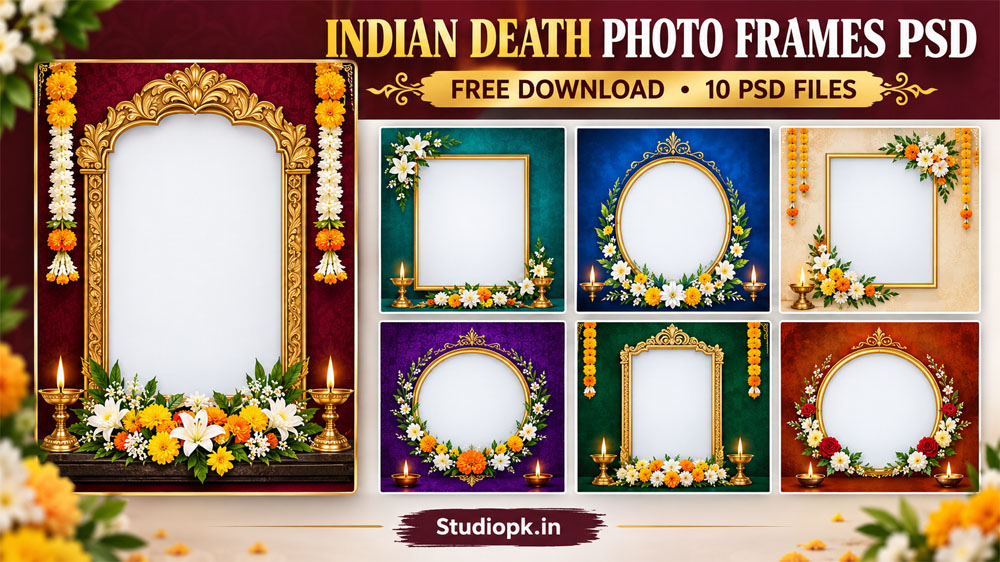
Free Indian Death Photo Frame PSD Templates
The collection has 10 designs. Some follow a traditional Indian memorial style, and others are modern and simple so that the portrait stays in focus. Every PSD has clearly named layers and a smart object for the photo, so replacing the picture and changing the text is easy even for a beginner.
The layout is simple: the portrait sits at the top, and the name, the date, and a short line such as “In Loving Memory” sit below it. Color and background layers are separate, so you can try muted or deep tones that match the mood you want. The same file also works as a social media post, a slide in a remembrance video, or a memorial card front.
What is included in each PSD
- Editable text layers for name, dates, and a short message
- Smart object photo placeholder for quick photo replacement
- Separate background and decoration layers for easy color changes
- High-resolution layout for clear online display and printing
How to Edit Indian Death Photo Frame PSD in Photoshop
- Click the Download button under the design you like and save the zip file.
- Extract the zip and open the PSD file in Adobe Photoshop.
- Double-click the smart object, paste your photo, then save and close it.
- Edit the name, date, and message using the text layers.
- Export the final image as JPEG or PNG, or keep it as a PSD for later changes.
Download Indian Death Photo Frame PSD Files
Below you will find a JPG preview of each design so you can see the layout before you download it. Look through the previews, pick the death photo frame PSD that suits your needs, and click the Download button under that image to get the file. Each button downloads one PSD file, so you only take the designs you need.


7 Easy Tips to Customize Your Death Photo Frame PSD
- Pick a color palette that suits the mood. Soft muted tones feel calm, and dark tones feel more formal.
- Use a readable font and keep the name larger than the date. For names in Marathi or Hindi, you can use our calligraphy Marathi fonts.
- If the original photo has a busy background, remove it with the Quick Selection tool and add a soft vignette. A plain backdrop from our studio background PSD collection also works well.
- Keep decorative elements subtle so they do not distract from the portrait.
- For printing, check the printer’s resolution and file requirements, and use a lossless format for final delivery.
- Keep the original PSD as a master copy and save a new file for each final version.
- For social media, export a smaller file that still looks sharp and loads quickly.
Quick Suggestions
- Color palette: Black, grey, off-white, deep maroon
- Typography: A clear serif or clean sans serif for the name
- Photo retouch: Remove busy backgrounds and add a soft vignette if needed
Frequently Asked Questions
Are these Indian death photo frame PSD files free?
Yes. Click the download button under any design to save the file.
Which software do I need to open these PSD files?
You need Adobe Photoshop. The files are layered PSDs with editable text and a smart object for the photo.
How do I replace the photo in the frame?
Double click the smart object layer, paste your photo, then save and close it. The frame updates automatically.
Can I use these frames for personal memorials?
Yes. For client or commercial work, please check our usage terms first.
Conclusion
These Indian death photo frames PSD templates give you a simple and respectful way to create a memorial tribute, whether it is for a death anniversary post, a funeral program, or a printed card. Choose a design you like, replace the photo, add the name and date, and your memorial image is ready in minutes. For more free templates, visit our free PSD designs page.